Showing posts with label holiday. Show all posts

Saturday, April 6, 2013

Software Easter Eggs

Software Easter Eggs
It's the time of year when stores are lined with pastels, jelly beans and chocolates shaped like eggs and rabbits, but in the software world an "Easter Egg" isn't a colorfully dyed hard-boiled egg. A Software Easter Egg is a fun little surprise hidden inside of the software program. These features are typically un-documented, so you have to be in-the-know to uncover them.
One particularly famous example is the flight simulator that was hidden inside the 1997 version of Excel. So, in addition to crunching numbers you could brush up on your piloting skills. Find more software Easter egg examples on the Lifehaker Easter egg top 10 list.
NCH doesn't have any of these kinds of Easter eggs hidden in our programs which we have tried to streamline as much as possible to keep everything as easy and straight forward as we can, but in the spirit of hunting for—or finding—hidden features, here are some lesser known, or less used features you may want to try:
  1. Resize zip files to meet email size restrictions, or split large zip files into pieces with Express Zip software.
  2. Record video from anywhere with Debut video capture software. Most recording programs focus on a single source, but with Debut you have the best of all worlds with support for a multitude of video sources.
  3. Send recurring invoices and statements in addition to one-off invoices Express Invoice invoicing software which can save you time with managing long term clients and accounts.
  4. Practice transcription, we provide dictation practice files that can be downloaded individually for Express Scribe, or KeyBlaze typing tutor has audio dictation exercises already built in.
  5. Convert videos to 3D with VideoPad video editor for some extra dimension in your home movies.
  6. Broadcast DJ mixes by connecting Zulu DJ software with the streaming power of BroadWave audio streamer to share your remixes online.
  7. Be sure to turn on Auto Complete in FastFox instant text expansion software to get the power of auto complete suggestions everywhere you type from emails and word documents to your web browser.

Tuesday, February 12, 2013

Software Sweethearts

With so much software, what's not to love?

VideoPad & Express Burn
This dynamic duo will guide you faithfully from beginning to end of any video project. Use VideoPad video editing software to capture, import, edit and add effects to your videos. Finish up by burning the video to DVD with Express Burn. Create a heartfelt video recording for your beau this Valentine's Day.

Sound Software Sweethearts
WavePad & MixPad
This pair is the audio software dream team. Use WavePad audio editor to record and edit a song first, then incorporate with other tracks with MixPad for your multi-track mixing needs. They work together seamlessly to help you create your own love song for your valentine this year.

Express Dictate & Express Scribe
If ever there was a practical match, it's this one. Express Dictate digital dictation software allows you to record dictation, and send to a transcriptionist, while Express Scribe makes transcription easy with features like variable speed playback, and file management.

Looking for the perfect match? Save by bundling related programs pairs and purchasing them together.

Wednesday, December 5, 2012

WavePad's Chicago Fire Cameo

Did you spot WavePad on the NBC show Chicago Fire? If you're a fan of the new NBC show Chicago Fire and you have sharp eyes you might have spotted WavePad on the recent Two Families episode that aired on November 21st. For those of you not familiar with the show it is an intense look at the lives of the firefighters and paramedics Chicago Firehouse 51. One of the subplots of this rather intense Thanksgiving episode includes one of the firefighters deciding to put together a podcast, and there is a scene with him doing an interview with another one of the station 51 firefighters. As they are talking if you are familiar with the WavePad interface you might recognize it in the computer sitting on the table between them. For us this was an added excitement to add to the already action packed television show.

If you haven't seen it you may very well want to start following the heroes portrayed in Chicago Fire. And if you want to create a podcast of your own you will want to have WavePad Audio Editing Software on your computer.

Monday, December 19, 2011

Send Personalized Video Greeting Cards

Make/Record A Video Greeting CardThe holidays are right on top of us, so I hope you got your presents mailed and your cards and letters sent. But even if you haven't gotten something in the mail yet, it isn't too late to send a heartfelt message to your loved ones, both near and far. With Debut Video Capture Software and a webcam, you can record yourself or your whole family in front of the computer to make a quick and easy video greeting card. Just like you've seen in those holiday commercials with the audio-recorded talking greeting cards and books, you can make a sentimental message with both video and voice that can be played over and over again, without going to the store, that can be delivered to a loved one's email inbox, or burned onto a DVD.

If you want your video to really shine, you can import the clips from your webcam into either VideoPad Video Editor, or PhotoStage Slideshow Software to do more polishing and editing, and combine with other video clips, or photos and music, but any heartfelt holiday message to family members far away can be enough to bring a smile and some holiday cheer.

Saturday, December 17, 2011

Want a Unique Gift Idea? Make Them a Radio Star

Guest Post by Emma Bell

One of the coolest things about modern technology is that anyone who has a story to tell has a pretty decent shot of getting it on the radio or their very own podcast. Unlike the days where a radio professional would be required to be in the studio reporting, now anyone can record an interview or story with any number of small and affordable recording devices; and the best part is that many stations are constantly looking for material. Like with any creative medium, the quality of content does matter – as does covering a topic that is timely, or timeless (also known as evergreen).

Software for RadioSome radio buffs go all out and purchase gear like digital flash recorders and professional microphones but many others simply use their phones to record, or their phone answering machines, laptops, etc. In terms of production you can get as detailed or simplistic as you choose because the truth of the matter is that if your story is compelling enough or something that no one else is covering many radio stations will be willing to work with it, no matter what the quality.

If you've got something of value to say you can simply record it and let the seasoned pros edit the piece, or you can try your hand at editing. There are many affordable audio software programs available that will take a bit of trial and error to learn but even Youtube offers video tutorials for many different programs on the market.

There are also many organizations who are encouraging budding radiomakers and documentarians of all ages by offering recording tips and advice, as well as platforms in which to present their features. Vocalo, based out of Chicago, is an interesting public radio platform that allows everyday people to have their own shows. Transom is a non-profit website that offers tips on the best gear to get and tips on telling stories and the Public Radio Exchange is a depot where you place your work and have radio stations come looking for you instead of the other way around. And with the rising popularity of do-it-yourself podcasts you can make your own radio show and build a following of fans without any need for a radio station to sign you on.

Thanks to technology it's a new day in radio making; an exciting time that rewards the everyday people who have interesting stories to tell. It's hardly the best way to try and get rich but it's a wonderful chance to say whatever's on your mind to an ever-growing audience. As a radiomaker you can help inform, entertain, get people to thinking and even help shape opinions. The best part is that with today's technology you can run your own show and get your own brand of uniqueness out there for all the world to hear.

Author Emma Bell writes for Coupon Croc. If you're looking for a new phone that records audio check out this Discount Voucher.

Monday, December 12, 2011

Make A Seasonal Slideshow

Make Holiday Slideshows with PhotoStage slide show softwareThere is something nostalgic about this time of year. Shopping for gifts, making holiday plans, going to parties. And between the parties, presents, and traditions�like sitting on Santa's lap, cutting a Christmas tree, decking the halls, or cooking the special family recipes that only come out once a year�there are also a lot of photos to share.

But what if this year, instead of posting hundreds of individual pictures to Facebook, you combined all your favorites into a slideshow that will warm the heart? PhotoStage Slideshow Creator, rated the best slideshow software by TopTenReviews, makes it easy to combine your memories into a truly magical movie slideshow starring none other than your family. TopTenReviews recently posted an article that runs down how to make a personalized winter slideshow with PhotoStage. With its easy-to-use interface, the most important thing is just to come to the table with your imagination, ready to play with and perfect your slideshow.

Whether you want set your photos to your favorite holiday songs, record the family caroling, or add captions or narrations, you have complete creative control to tell the story of any memorable holiday, moment or event. If a picture is worth a thousand words, a slideshow is easily worth ten thousand, and with easy sharing options, lots of transitions, and dynamic features, there is no better way to create a slideshow than with PhotoStage Slideshow Maker.

Friday, November 25, 2011

Create Your Own Photo Mosaics for the Holidays

Create Unique Holiday Photo Mosaics with PhotoPadGive a unique and personalized gift this holiday season as well as share and preserve memories, make a photo mosaic image with PhotoPad photo editing software. The photo mosaic feature is similar to the collage feature but it builds a larger, composite image out of your photo collection using many small images. Unlike the mosaic posters and photos you may have seen on sale at the mall, the mosaics you make with PhotoPad can contain dozens of pictures all of your family and friends.

This a really fun tool to play with since there are a lot of different options and settings to experiment with as you edit the photo mosaic to get the results you want. You can change the numbers of tiles, swap out the template image which is the "big picture," change the folder that the tile images will be taken from, and the size of the image. I changed the background color of the image and made the mosaic smaller to add border around my mosaic.

On the Insert tab of PhotoPad's menu, click the mosaic button and select the image that will be used as the template for the mosaic. The level of detail in the mosaic is proportional to the number of images in the Tile Collection folder and the number of tile columns and rows specified in the Mosaic Image Properties. The default amount of tiles is rather low, so I recommend increasing the initial numbers. I also encountered mixed results when I only had 20 images in my Tile Collection folder. I saw a much greater variation in my final mosaic image when I had dozens of images in the Tile Collection folder, so make sure you give PhotoPad a good variety of photos to choose from.

PhotoPad is free, so download PhotoPad today and try out the mosaic feature. And if you like PhotoPad, check out more of our software gift ideas including PhotoStage slideshow software for another fun way to combine your photos into a unique and personal gift.

Friday, April 15, 2011

Now In 3D

xkcd 3DOne of the favorite comics here in the office is xkcd, a somewhat geeky webcomic with math, science and technology themes.

For April Fool�s Day the site went 3D (XK3D). Since this foray into the third dimension lined up so closely with NCH Software's own 3D addition, with the new stereoscopic 3D video content support that was added in the most recent release of VideoPad (version 2.30), I thought it was the perfect opportunity to introduce any of our readers who are not familiar with xkcd to its wonders.

Note: if you're new to xkcd, make sure you don't to miss the hover over text on each comic as you surf through their archives.

Friday, February 4, 2011

Mix Up Your Valentine's With A Sweet Gift

Make A Mixed CD For Your ValentineValentine�s Day is a day for love but it can also be a day of great stress. Finding just the right gift for the one you care about on a tight budget can be mind boggling and quite taxing.

Make this Valentine�s unique by bringing back the puppy love from �85 and making your sweetie a mixed CD. Fill it with songs from your memories together, or revive your passions with new songs that tell how you feel.

Use Express Burn CD Burning Software to copy your heartfelt songs to disc so your beau can listen in the car or upload your creation to their iTunes. Get crafty and make a CD label with Disketch Disc Label Software to completely customize your one-of-a-kind gift.

Browse more NCH Software to find your own creative gift ideas.

Wednesday, February 2, 2011

Break Free From The Groundhog Day Typing Tedium

Stop Tedious Typing Tasks Most people are familiar with the movie Groundhog Day where Bill Murray gets trapped living the same day over and over again. While it is a funny film, I can't help but sympathize with his frustration and how hard he tries to break out of the routine and tedium of living the same thing over and over again. One thing I like about my job is that every day is different. It is nice to have different things to do to help keep things fresh, but even more dynamic jobs can have a hint of a repetitive undercurrent. On the bright side, using FastFox text expansion software helps reduce some of the monotony by helping you get through some of those tasks faster. By saving frequently used text such as answers to common questions, descriptions of the company or various products, or even phrases that you are bound to misspell or waste time correcting, you�ll get on to the next challenge quicker. And since Punxsutawney Phil forecast an early spring, using FastFox shorthand software also means you�ll get to enjoy spring sooner.

Wednesday, December 15, 2010

Put a DJ in da House (Next to the Christmas Tree)

Give DJ Software to the music lover on your holiday shopping listDo you know someone with tons of music, opinions on how it should be listened to, and with a desire to share their music with others? It might be time to give them the opportunity to become a disc jockey.

At first thought, it sounds expensive. Think of all the records, the turntables, the earth-moving speakers, the disco ball�then calm down. You don't need any of these to get started! All that you need is Zulu DJ software, and your existing music collection. Designed for beginners and professionals alike, Zulu gives any DJ-in-training the tools to start out with a basic setup and will grow with them as they begin to buy and use all that hefty equipment later on.

Beginners can practice transitioning between songs loaded on virtual decks, and with automatic beat detection, cross-fading, live effects, and synchronization between tracks, Zulu will make any DJ newbie sound like they know what they are doing. Soon, they'll be cueing up the next track and applying effects on the fly for a completely customized music experience.

Zulu also works great as an auto-DJ for those who want control over the music without the maintenance. Simply pre-load a playlist into the program, and Zulu will keep the music coming all night long, with seamless transitions between each track so you'll never hear a pause in the music at your holiday parties or upcoming New Year celebrations.

So if you're struggling with those last-minute gifts, consider Zulu for the music lover on your list. Then throw a party and put them in charge of the tunes!

Monday, December 13, 2010

Give A Gift of Memories

If you are looking for a really special gift idea, why not give new life to your home movies? Whether they are on VHS cassettes or just taking up disk space, you can easily edit them together and create a memorable home movie DVD for a truly priceless gift to give your loved ones.

First, collect together all of the home videos you want to use. If you have any old analog home movies stored on an old camcorder or VHS tapes you can use a Golden Videos VHS to DVD Converter with a video capture device to connect your camcorder or VCR to your computer and digitize your home movies in no time.

Edit Home Movies for a Memorable GiftWhen you have all your video clips collected you are ready to start editing with a quick and easy video editing program like VideoPad. Trim down clips, arrange on the timeline and select transitions. Add a soundtrack or record your own narration to share your memories about the recorded events. VideoPad also has a video stabilization feature to help clean up shaky video if your hand wasn't very steady when you were recording. And for a little extra emphasis you can even adjust the speed of video clips to add in an instant replay of that first home run or other momentous event. VideoPad is very user friendly so editing your home movies really only takes a little time and a little creativity.

Once your editing is complete you are ready to package everything together. Give your video the finishing touch by burning to DVD and adding a custom DVD label for a polished and professional looking final product.

See our software gift ideas page for more ideas on software programs to give, or other ways to add a little personal flare to your gifts.

Friday, December 10, 2010

Holiday Photo Creativity

Create custom video slideshows to share online or DVD with PhotoStage slideshow softwareIt�s the holiday season again, which means it�s time for family, food and photos. What should one do with the boundless amounts of photographs taken at this time of year? You should share them � and this year instead of making a resolution to send out a custom scrapbook to each family member (a goal most of us can never keep), I�m going to create a custom slideshow to send to the whole family.

It�s quick and simple with PhotoStage Slideshow Software. You can easily combine pictures with video clips and add sound or narration for a more festive slideshow. What better way to show off baby�s first Christmas than to give a play-by-play with sequence shots or add your favorite holiday tunes and videos? If you�re anything like me, you print your photos and stack them in a dusty box in some remote location, where no will actually see them � this year I�m going to make a captivating visual experience with them instead.

PhotoStage comes equipped with an array of transition effects so you can make every slideshow a unique event to be shared. You can edit your photos from right within the program, giving you complete control of the outcome.

My favorite part is being able to share my slideshows on my iPhone so I can look at them on-the-go! Making video slideshows really is worlds better than leaving holiday photos in a dusty box to never be seen again.

Monday, October 25, 2010

Scary Halloween Tutorial: Make a Howling and Haunting Halloween Soundtrack

5 easy steps for making your own Halloween soundtrack

Last week we showed you how to spookify your screen saver in 3 easy steps using VideoPad. This week we'll help you prepare for that Halloween party you have planned, or for setting a spooky atmosphere for your trick-or-treaters with a haunting halloween soundtrack.

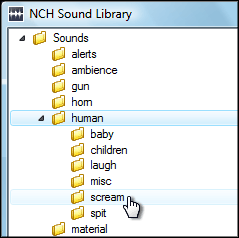
NCH Software Sound Effect Library1. Using WavePad audio editor, download three sounds from the sound effect library, found under the Tools menu. We recommend Ambience SciFi 1 for the background, and Nature Weather Lightning 3 and Human Scream 1 as accent sounds. Save them in a location you can remember. To download more than three sounds, upgrade to the WavePad Master's edition, or record more sounds of your own.

2. Open your downloaded sounds in WavePad. For the basics of using WavePad, view the WavePad tutorial series.

3. Copy your background sound and paste at the end of the file one or two times, so the length of your soundtrack becomes a few minutes long.

WavePad Audio Paste Mix 4. In this step, you are going to add your accent sounds to your background sound. Copy the entirety of one of your accent sounds, then go back to the window with your background sound. Place your cursor in a random location, then select Paste Mix from the Edit menu and click OK on the dialog that appears. The accent sound will be pasted over the background sound. Repeat this process as many times as you want for each accent sound throughout the duration of the background sound file.

5. Save your finished background file with the added accents to a format suitable for your CD player or portable device. When you play the soundtrack, make sure you loop it so the sounds play continually throughout your Halloween night.

With Christmas around the corner, you can get a head start on personalizing Christmas songs with reindeer noises, elves cheering, and bells ringing using the same steps given here. Feel free to share your creations, and we'll feature you on our blog!

Wednesday, October 20, 2010

Scary Halloween Tutorial: Spookify Your Screen Saver

3 Easy Steps for Making Your Own Halloween Screen Saver

With Halloween on the horizon, you might want your screen saver to reflect a serene cemetery scene, or a haunting moonlit evening. Follow these easy steps and we'll show you how to create your own personalised screen saver free.

1. Create a short Halloween movie or slideshow using VideoPad video editor and your favorite Halloween images and video clips.

If you're new to VideoPad or video editing see our VideoPad tutorial to help you get started.

Save videos as WMV files to use as a windows screen saver 2. Save your movie as a wmv file in its own folder. To do this, click the Save Movie icon in the toolbar, choose the Computer / Data output format, and then select the wmv file format. Click the Browse button to choose the save destination. Don't forget to create a new folder for your screen saver movie.

3. Under the Screen Saver settings in Windows, select the Photos option, and click Settings. Browse for the folder where you saved your movie, click Save, then click Apply. Next time your screen saver comes on, you'll be spooked!
Set your new movies as your windows screen saver

Now that you know how easy it is to make your own seasonal screen saver you can add easily add a little fun and flair to any occasion.

Check back soon for another Halloween tutorial: Make a Howling and Haunting Halloween Soundtrack.