Showing posts with label CD. Show all posts

Tuesday, December 11, 2012

Disketch Best Disc Label Software

Recently Software Review Boffin reviewed our Disketch CD/DVD Label Software noting that "it can create professional CD and DVD labels in a blink of an eye." If you are making your own mixed CDs or home Video DVDs for the holidays this can be the perfect finishing touch.
Award for Disketch Disc Label Software and CD Label Maker
"With Disketch Disc Label Software users can create a vast range of CD or DVD labels quickly and effortlessly. Additionally, [we] were able to create labels and covers with an ease and smoothness that made the exercise a pleasant experience. Letting you put your own personal touch on your CD and DVDs."
  � Software Review Boffin

You can read the complete review on Software Review Boffin, or head over to nchsoftware.com to download Disketch Label Maker Software to get started creating your own unique CD and DVD covers and labels.

Friday, August 17, 2012

5 Star Burning Software for Mac

5 stars for Express Burn Mac DVD Burning SoftwareThere are a lot of choices when it comes to burning software these days, which is just one of the reasons that it is wonderful to see strong reviews like this one from BurnWorld.com, calling NCH's Express Burn "a great application, working fast, featuring the most important processes a user would want." Better yet that, while these experts clearly recognize and point out that "the interface is very easy to use," this review was from a previous release, before we made modifications to the interface to make the creation of DVDs and audio or MP3 CDs even easier. Along with other additions, including better DVD authoring with several included menu templates, and the ability to burn not only data to Blu-ray discs, but to burn your high-definition Blu-ray movies too.

You can read the complete review of Express Burn, and we encourage Mac and PC users alike to try all the burning features and see how easy burning software can be.

Monday, May 7, 2012

K is for Keep

software to backup, encrypt, store and save your files. Keep your data safe.NCH Software ABCs Series

Having a computer crash or losing files or mobile devices is incredibly stressful. Not only is it inconvenient, but our lives are becoming more and more digital and there is a lot more at stake than just the computer itself. I myself have plenty of things that I want to hang on to and I'm sure you do too. Here are some software tools you should take a look at to help you recover, backup, save, or store your documents.

If you have lost a file there is still a chance you can recover it. With Orion File and Photo Recovery Software you can scan your Windows PC or external drives for any deleted files that haven't been overwritten. You may be able to locate and recover the file, which is helpful for when something is accidentally deleted. However data recovery software shouldn't be your only line of defense in preventing file loss.

FileFort Backup Software provides a simple and easy to use interface for backing up your important files or folders to a variety of different destinations. You can decide where the best place to store your data is, whether it is an external hard drive, network folder, or a remote drive accessed via ftp. You can also store on physical media, including a USB stick or burning to a CD. FileFort is ideal for regularly backing up a smaller set of files. For backing up more extensive file systems on disc or via FTP you can also take a look at Express Burn or Fling FTP File Synchronization Software.

MEO Encryption Software is another important tool to have on hand if you have any files containing sensitive information. By encrypting your files you can make sure important information is kept away from prying eyes. Encryption is most useful when sharing information with others, but make sure you have safeguards in place on private information, such as a solid fire wall system and anti-virus protection.

<<< Previous: J is for Jams
Next: L is for Live >>>

Friday, January 6, 2012

A is for Audio

NCH Software ABCs Series

A is for Audio SoftwareWhat better place to start our A to Z software tour than at the beginning�both the beginning of the alphabet and the beginning of NCH�Audio.

NCH Software was originally named NCH Swift Sound when it was founded in 1993 largely because many of our earliest products were sound and audio software solutions. Even though we have since expanded our range of software tremendously, to this day our WavePad audio editing software remains not only a company favorite, but our top selling program, currently available for Windows, Mac, iPhone and the iPad with millions of users worldwide.

WavePad may be the core of our audio software category but there are several other big players including MixPad multi-track mixer, Switch audio converter and SoundTap streaming audio recorder, just to name a few. You really can do more with audio using our complete range of audio software programs:

Next: B is for Business >>>

Friday, October 7, 2011

Burn and Label CD and DVDs on Windows or Mac

CD DVD Label Software for Mac or WindowsNCH Software provides a wide range of multimedia software allowing you to record, edit, convert and combine digital photos, audio and video files. And what comes after your digital remastering? You can take advantage of the Upload to YouTube feature built into many of our software programs, but another great option is to burn your projects to CD or DVD. With Express Burn Disc Burning Software you can burn audio, video and data to CDs, DVDs and even Blue-Ray discs in a variety of file formats. Simply drag, drop and burn and in minutes you have a finished disc. You could stop there, or maybe scribble something on the disc with a sharpie, but if you want to really make your burned discs stand out you can create customized CD and DVD labels and cases with Disketch Disc Label Software for that finishing touch and to help keep your discs organized.

Disketch Labeling Software was recently released for the Mac for the first time, making it easy for anyone to create personalized labels and cases by adding text, color and images.

Friday, September 2, 2011

Express Burn Improvements, More to Come

Express Burn Disc Burning Software ImprovementsNew versions of Express Burn disc burner for both Windows and Mac were released in the last week. These latest releases feature greatly improved performance over past versions, bringing you a disc burning program that burns quicker, more reliably, and more easily than ever before. Not simply a disc copier, you can use Express Burn to burn any music, data or video files on CDs, DVDs and Blu-Ray discs for easy archiving, sharing, or file management.

More developments, including DVD menu creation, are in the works for Express Burn in the coming months, so this is definitely a program you want to keep your eye on. Try it out now and see why Express Burn is one of our top products.

Monday, March 28, 2011

Archival-quality Audio from Vinyl with Golden Records

4.5 Star CNet review for Golden Records Vinyl to CD, LP digitizing softwareGolden Records Vinyl to CD Converter is one of our more popular software programs, offering an easy step-by-step process for converting vinyl LP records and analog audio cassettes to CD or mp3 files. It seems the people at CNET agree, having recently given it high marks, saying, "We've tried many such tools, yet we've often gone back to [Golden Records], which also converts tapes and other analog audio sources." The reviewers went on to say:

"We transcribed several LP records ranging from audiophile quality to barely playable with Golden Records, achieving excellent, archival-quality results each time. The auto track splitter worked fine on scratchy old platters, though recording tracks in the highest possible quality and then splitting and converting them manually using a WAV editor proved the best method for better-quality discs. The sound files produced by Golden Records Vinyl to CD Converter sounded great, whatever the source."

CNET

You can read the complete review of Golden Records Analog to CD/MP3 Converter from CNET on download.com. Or, download today to take advantage of the free 14-day trial and easy wizard based process to start digitizing your vinyl record collection.

Friday, February 4, 2011

Mix Up Your Valentine's With A Sweet Gift

Make A Mixed CD For Your ValentineValentine�s Day is a day for love but it can also be a day of great stress. Finding just the right gift for the one you care about on a tight budget can be mind boggling and quite taxing.

Make this Valentine�s unique by bringing back the puppy love from �85 and making your sweetie a mixed CD. Fill it with songs from your memories together, or revive your passions with new songs that tell how you feel.

Use Express Burn CD Burning Software to copy your heartfelt songs to disc so your beau can listen in the car or upload your creation to their iTunes. Get crafty and make a CD label with Disketch Disc Label Software to completely customize your one-of-a-kind gift.

Browse more NCH Software to find your own creative gift ideas.

Monday, October 25, 2010

Scary Halloween Tutorial: Make a Howling and Haunting Halloween Soundtrack

5 easy steps for making your own Halloween soundtrack

Last week we showed you how to spookify your screen saver in 3 easy steps using VideoPad. This week we'll help you prepare for that Halloween party you have planned, or for setting a spooky atmosphere for your trick-or-treaters with a haunting halloween soundtrack.
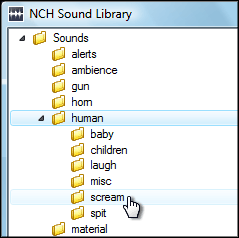
NCH Software Sound Effect Library1. Using WavePad audio editor, download three sounds from the sound effect library, found under the Tools menu. We recommend Ambience SciFi 1 for the background, and Nature Weather Lightning 3 and Human Scream 1 as accent sounds. Save them in a location you can remember. To download more than three sounds, upgrade to the WavePad Master's edition, or record more sounds of your own.

2. Open your downloaded sounds in WavePad. For the basics of using WavePad, view the WavePad tutorial series.

3. Copy your background sound and paste at the end of the file one or two times, so the length of your soundtrack becomes a few minutes long.

WavePad Audio Paste Mix 4. In this step, you are going to add your accent sounds to your background sound. Copy the entirety of one of your accent sounds, then go back to the window with your background sound. Place your cursor in a random location, then select Paste Mix from the Edit menu and click OK on the dialog that appears. The accent sound will be pasted over the background sound. Repeat this process as many times as you want for each accent sound throughout the duration of the background sound file.

5. Save your finished background file with the added accents to a format suitable for your CD player or portable device. When you play the soundtrack, make sure you loop it so the sounds play continually throughout your Halloween night.

With Christmas around the corner, you can get a head start on personalizing Christmas songs with reindeer noises, elves cheering, and bells ringing using the same steps given here. Feel free to share your creations, and we'll feature you on our blog!

Friday, September 10, 2010

Software for Musicians

Audio Software is one of our biggest categories, and sound editing is just the beginning; we have lots of tech solutions for musicians too. From music recording software to other handy musician software tools, each program is specifically designed for a particular music related task so musicians can go high tech while tuning, transcribing or even just practicing. Check out a few of our audio software favorites for musicians:

Software Applications for MusiciansTwelveKeys Music Transcription Software is perfect for any musician trying to learn how to play a piece of recorded music, or for notating compositions. TwelveKeys provides a visual aid for musical transcription using a graphical representation of the music, allowing musicians to notate any orchestration with accuracy and ease.

Crescendo Music Notation Software is a simple way to work with musical notation. Crescendo allows musicians to compose, save and print music from their computer. The wide array of notation symbols, time and key signatures, and text on a free-form layout gives you complete control over musical arrangements.

PitchPerfect is a free guitar tuner that also works great for other string instruments. It automatically detects the note you are playing and lets you know if you are sharp, flat, or perfectly in tune. Performing will be less daunting, having this product to eliminate the need of tuning a guitar conventionally.

TempoPerfect is a free software metronome. Designed to help musicians play in time, this tempo software creates accurate beat patterns for simple or complex rhythms. TempoPerfect provides a clear and precise beat that won't wind down, making it an essential tool for all musicians.

WavePad Sound Editor is designed to be an easy to use audio editing package. Within minutes you will be able to open or record a file and edit it. It has many robust tools including audio effects to amplify, normalize, reverb, a free sound effect/music library, text-to-speech voice synthesis, and a voice changer, just to name a few. Combined with MixPad multitrack mixing software, these two audio applications are perfect for any audio project, from making soundtracks and podcasts to creating high quality demo CDs for your band.